 ChartsGPT
Crypto chart analysis
A clearer read on your next crypto chart.
Bring your Bitcoin, Ethereum or altcoin chart. ChartsGPT turns the screenshot into a structured technical analysis, with levels to inspect, possible scenarios and the point where an idea stops making sense.
Download on the App StoreiPhone & iPad · Free download · Pro for full access
- Bitcoin, Ethereum and altcoin chart screenshots
- Trend, support, resistance and scenario context
- For intraday review and swing trading preparation
How to analyze a crypto chart with ChartsGPT
Start with a screenshot that shows the asset, exchange or pair, timeframe and price scale. Keep enough candles visible to show the recent trend and range. A cropped breakout candle rarely explains why that breakout matters.
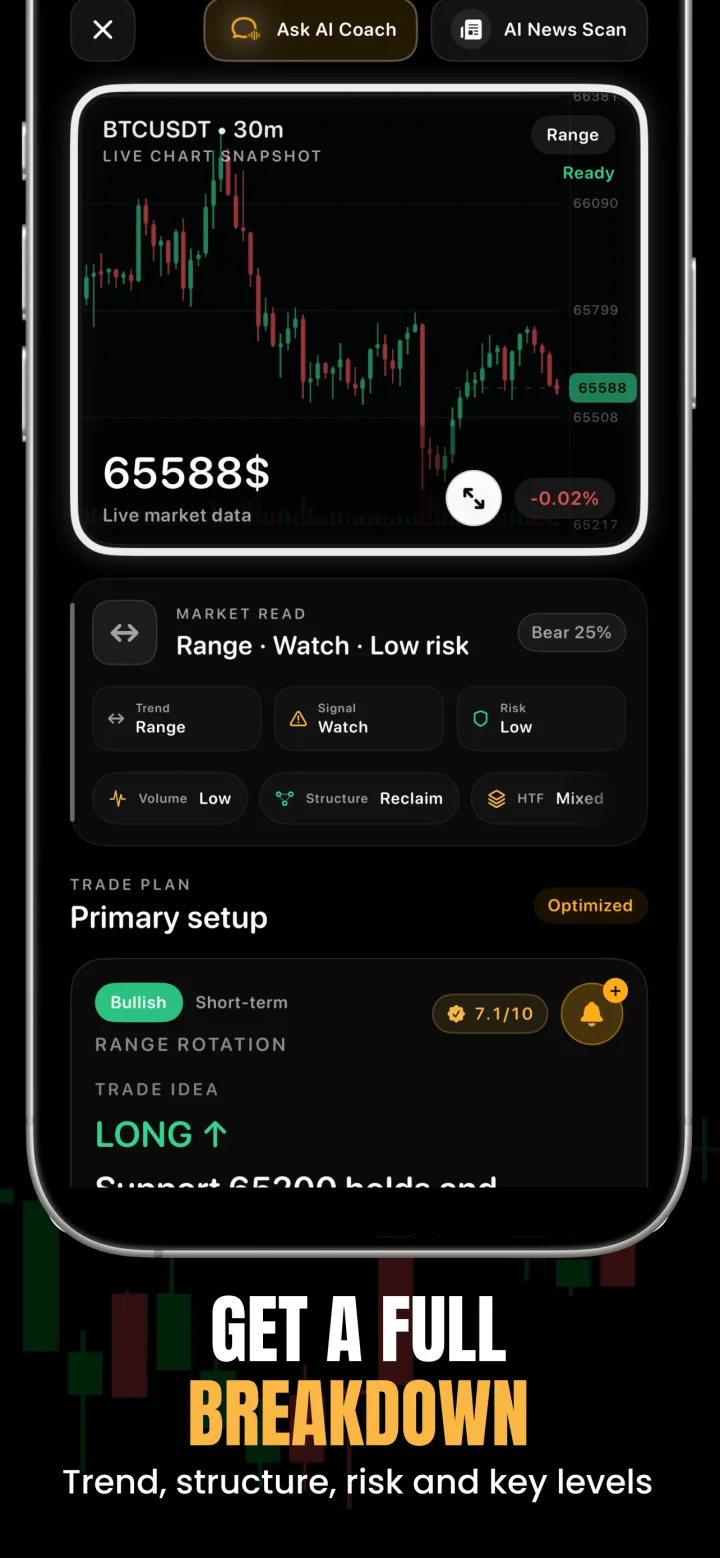
Open ChartsGPT on your iPhone or iPad, choose your image or use the camera, and review the breakdown. Compare the identified levels with the source chart before using a scenario in your own plan. AI analysis can misread a label or miss context, so that comparison is part of the workflow.
- Check the market direction and nearby swing structure.
- Inspect support and resistance around the current price.
- Read both the continuation and failure scenarios.
- Review potential entry, stop, target and invalidation together.
Keep the pair and the market context in view
A BTC/USD chart, a BTC/USDT perpetual and a thinly traded altcoin do not describe identical trading conditions. Keep the full symbol and exchange label visible when taking the screenshot, and check that the analysis has interpreted the instrument correctly.
ChartsGPT combines chart interpretation with available market data. That does not make the screenshot a live order book. Recheck the current price, liquidity and spread on your trading platform, especially if you saved the image earlier. Perpetual funding, liquidation conditions and exchange-specific prices also deserve a separate check.
A crypto chart review, without a price prediction
Imagine an illustrative chart where price has repeatedly stalled at the top of a range. A useful review asks what happens if price moves above that zone and holds, and what happens if the move fails and returns inside the range.
The first scenario needs evidence of acceptance above the level; the second needs evidence that the breakout has failed. The screenshot analysis helps organize those possibilities. Neither scenario is a promise that the next candle will follow it. Record which event you are waiting for and what would invalidate the idea before deciding whether to act.
- For day trading: inspect nearby levels on the timeframe you actually trade.
- For swing trading: include the wider range and higher-timeframe trend.
- For a stale screenshot: refresh the chart before making a decision.
What the chart cannot settle for you
Crypto trades around the clock, but participation and liquidity change. A tidy pattern can become irrelevant after an exchange event, a token announcement or an abrupt shift in the wider market. An image alone cannot establish all of those conditions.
Use your own risk limit and check order execution costs separately. Leverage changes exposure and liquidation risk; a convincing AI explanation does not reduce either. If the setup lacks room before the next opposing level, or you cannot explain where it fails, keeping it on a watchlist is a valid outcome.
A few useful answers
Before your next chart.
Can ChartsGPT analyze Bitcoin and Ethereum screenshots?
Yes. You can upload Bitcoin, Ethereum and other crypto chart screenshots. Include the full symbol, timeframe, readable price scale and enough price history, then verify that the breakdown matches the original chart.
Does ChartsGPT execute crypto trades?
ChartsGPT provides educational chart analysis and trade scenarios. Its trading simulator is for practice; reviewing a setup does not place an order on a crypto exchange.
Can I use a TradingView screenshot?
Yes. Use a clear chart screenshot from TradingView or another charting platform. Keep labels and candles readable and avoid panels covering the price action. ChartsGPT is an independent app and is not affiliated with TradingView.
Is this a crypto price prediction app?
The analysis describes technical context and possible scenarios. It cannot guarantee future prices, successful trades or the outcome of a breakout.
Read a little deeper.
Less friction. More context.
Bring your next chart.
Explore ChartsGPT on iPhone and iPad. Review current plans and compatibility in the App Store.